The Difference Between a PIM and an ERP
A Product Information Management system and an Enterprise Resource Planning system solve different (but connected) problems. A PIM is built to create consistent, buyer-ready product content across digital channels. An ERP is built to run operations and transactions reliably. Understanding the difference between PIM and ERP is the first step. Building a strategy where both work together is where distributors unlock scale.
What is a PIM System?
A Product Information Management system is designed to centralize, manage, enrich, and distribute product information so it’s consistent and usable across the channels where customers and partners interact with your catalog. In plain terms, a PIM system is where you build the product story your buyer needs to confidently select, compare, and purchase.
In distribution, product information is rarely “just a description.” It’s structured attributes that power search and filtering (voltage, tonnage, connection type, material, dimensions). It’s the documents that de-risk purchases (submittals, spec sheets, SDS, install guides). It’s images, alternate units of measure, compatibility details, and category structure that makes your catalog navigable.
A PIM system typically manages:
- Structured attributes that support search, filtering, and comparisons
- Category and taxonomy rules so similar products are classified consistently in a logical manner that your customers expect
- Digital assets like images, PDFs, certifications, and safety documentation
- Product enrichment workflows for creating, reviewing, and publishing content
- Channel-ready outputs so content can be published where it needs to go
If you’ve ever tried to support modern digital commerce while your product content lives in a mix of spreadsheets, PDFs, and tribal knowledge, you already know the pain points a PIM system addresses:
- Multiple teams updating product info in multiple places
- Inconsistent attribute definitions and naming conventions
- Slow turnaround when suppliers update data or products change
- “Good enough” product pages that cost you conversions and calls
A PIM system reduces those issues by giving your business a single place to manage buyer-facing product data, apply governance rules, and publish consistent content to your digital channels.
One important capability for B2B distribution is data syndication. A PIM system can help you format and distribute product content to downstream systems, partners, customer networks, and marketplaces without reinventing the wheel for each new requirement. Instead of one-off exports and manual cleanup every time, your team can manage rules once and publish repeatedly with confidence.
What is an ERP System?
An Enterprise Resource Planning system is built to manage and integrate the core operational processes of a business. An ERP system is where transactions happen, where operational truth is maintained, and where your organization tracks the movement of money, inventory, and orders.
For distributors, an ERP system is typically where you manage:
- Item masters (your foundational SKU records and identifiers)
- Inventory management (availability, replenishment, and location-based stock)
- Pricing and costing (customer-specific pricing, contracts, and margin controls)
- Order processing (order history, invoicing, returns, credits)
- Purchasing and receiving (suppliers, POs, lead times, receiving workflows)
- Financials and reporting (accounting, forecasting, and operational reporting)
In other words, an ERP system keeps the business operationally correct. It’s built to support repeatable processes, handle exceptions, and provide the controls distributors need to fulfill accurately and maintain profitability.
What an ERP system is not typically designed to do is manage buyer-ready product content at scale. Many ERP environments can store basic item information, but they’re not built for rich attribute governance, channel formatting, large volumes of media and documents, or the workflows needed to continuously enrich product content for digital channels.
That’s why Product Information Management vs Enterprise Resource Planning is not an either/or decision for many distributors. It’s about assigning each system the role it’s built for, then connecting them so your teams and customers get a consistent experience.
Key Differences Between PIM and ERP
Both systems can touch product-related data, but they are built for different purposes, different users, and different outcomes. Here’s a practical comparison:
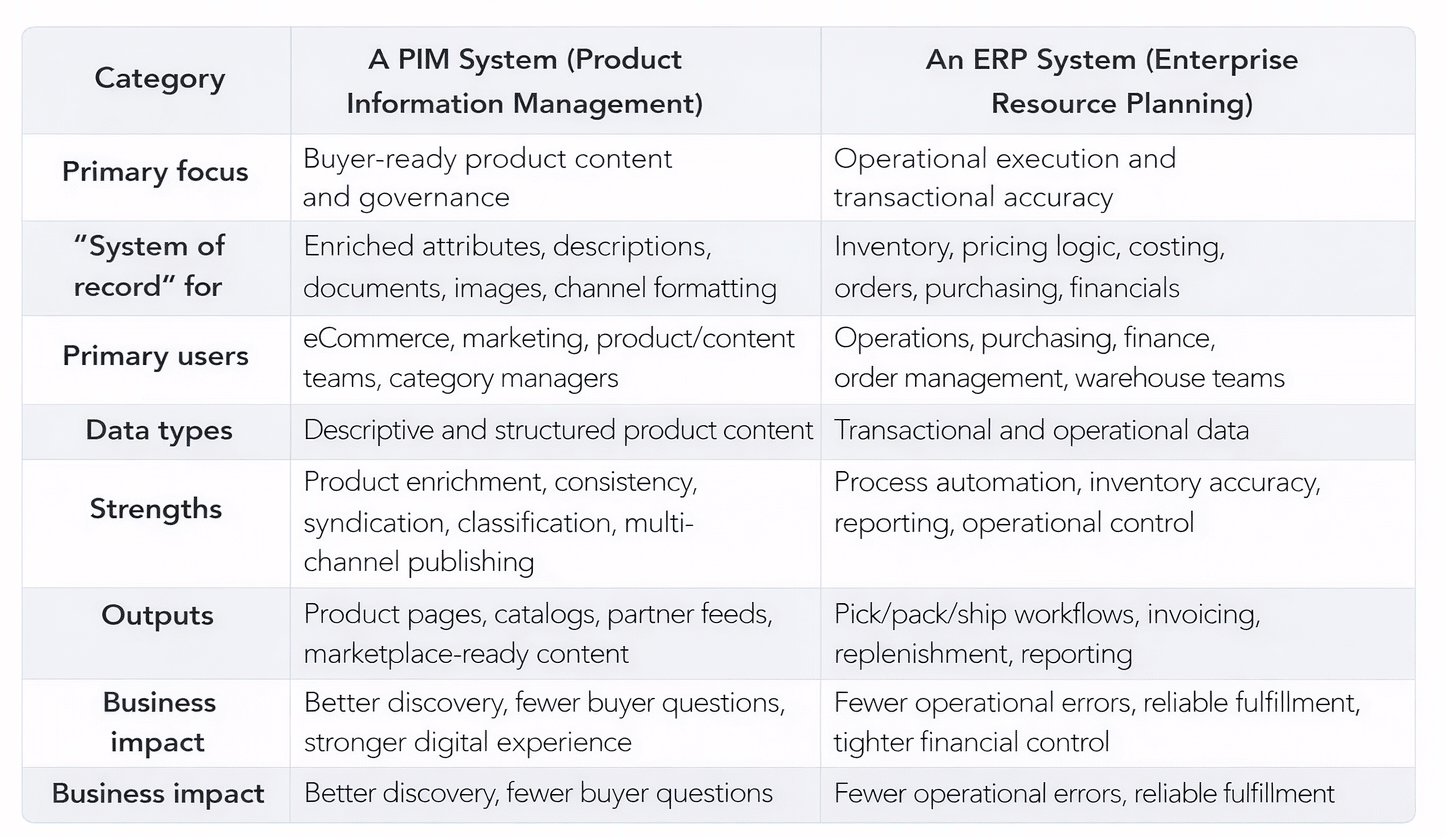
A helpful way to think about the PIM vs ERP split is the questions each system is built to answer:
- Your ERP answers: “Do we have it? What does it cost? When can we ship it? What did we invoice?”
- A PIM system answers: “What is it? What are the specs? What is it compatible with? What documentation supports it? How should it appear across channels?”
When a distributor tries to force an ERP system to act as a product content engine, updates slow down, enrichment becomes manual, and product pages stay thin. When a distributor tries to run operational processes out of a PIM system, the result is missed controls and unreliable transactions. The best outcomes come from letting each system do what it’s designed to do, then connecting them through a clear integration strategy.
When B2B Distributors Need Both Systems
For most distributors, an ERP system comes first because it runs inventory, pricing, purchasing, and order processing. As digital commerce grows and product content demands increase, a PIM system is typically introduced to centralize enrichment, improve governance, and keep product information consistent across channels. The key is recognizing the triggers that signal “Do I need both PIM and ERP?” is no longer theoretical.
Your catalog growth is outpacing your ability to maintain content
If you are adding SKUs, suppliers, categories, or acquired lines faster than your team can keep product pages accurate, a PIM system becomes essential. It provides governance, repeatable enrichment workflows, and a scalable way to handle change.
Digital commerce is no longer “secondary”
Once your website, portal, or eCommerce platform becomes a significant revenue channel, product content quality becomes a revenue lever. Buyers need attributes for filtering and comparisons, accurate documentation, and confidence that what they see online aligns with reality.
You sell across multiple channels with different content rules
Distributor catalogs often need to support a mix of experiences: web, customer portals, line cards, digital catalogs, partner feeds, buying group requirements, and sometimes marketplaces. A PIM system helps manage channel requirements without multiplying manual work. Your ERP system continues to support the operational truth behind each transaction.
Your teams are stuck in constant manual cleanup
If someone’s weekly routine includes fixing product descriptions in three places, hunting down missing PDFs, or reconciling “which spreadsheet is correct,” that’s not just an annoyance. It’s a scalability ceiling. A PIM system helps eliminate the rework by establishing one governed hub for product content.
You need clear ownership and accountability for product data
Operational governance (inventory, purchasing, financials) is not the same as product content governance (attributes, documentation, naming conventions, publishing rules). Distributors that treat these as one problem typically struggle. Distributors that assign clear ownership to an ERP system and a PIM system—and connect them—move faster with fewer mistakes.

The Power of PIM-ERP Integration for Distributors
A PIM system is powerful on its own. An ERP system is powerful on its own. But for distributors, the real multiplier is PIM ERP integration—connecting buyer-ready product content with operational truth so your teams and customers experience one coherent ecosystem.
Streamlined Product Data Management
Integration reduces duplication and confusion about where data should live.
A common best practice looks like this:
- Your ERP system remains the system of record for item identifiers, operational status, transactional rules, costing, and inventory logic.
- A PIM system becomes the system of record for enriched attributes, digital assets, documentation, and channel-specific publishing rules.
When those boundaries are clear, teams stop recreating product information in multiple systems. You reduce bottlenecks, establish cleaner workflows, and make product updates more reliable. Instead of “Who owns this field?” you have a defined answer.
Enhanced Inventory Accuracy
In B2B, buyer confidence depends on operational reality. Availability, lead times, and order status are typically managed in an ERP system because they’re part of inventory management and fulfillment processes.
When your digital experience can reliably reflect those operational signals, customers see fewer surprises after checkout and fewer “Can you confirm this?” calls land on your customer service team. Integration supports more consistent experiences across:
- Multi-branch availability visibility
- Special-order and non-stock workflows
- Substitutes and alternates when preferred items are unavailable
A PIM system helps ensure the product content is clear and structured. Your ERP system ensures the availability reality is accurate. Together, they reduce friction for both buyers and your internal teams.
Faster Time-to-Market for New Products
Product launches are not just a manufacturer problem. Distributors add new products constantly: new suppliers, expanded categories, acquisitions, seasonal items, compliance updates, and replacement lines.
With an integrated approach:
- Your ERP system establishes the SKU record and operational foundation.
- A PIM system ingests those records and drives enrichment workflows using templates and governance rules.
- Once content meets quality standards, product pages and feeds can be published consistently.
- The result is a launch process that is repeatable, scalable, and less dependent on heroics from one or two internal experts.
Improved Channel Management
Different channels require different content. A contractor browsing on mobile needs quick access to specs and alternates. A procurement team may need certifications and compliance documentation. A marketplace feed may require rigid attribute formatting. A partner program may require a specific taxonomy.
A PIM system is built to manage channel-specific requirements and outputs. An ERP system continues to provide the operational data those channels depend on—pricing rules, inventory, and order status. That division of labor helps you scale digital commerce without constantly rebuilding content from scratch.
This is also where data syndication becomes practical. Instead of creating one-off exports each time a partner needs updated data, a PIM system can support repeatable syndication rules, while your ERP system continues to provide the operational backbone.
Common PIM-ERP Integration Challenges
Integration is powerful, but it is not automatic. The distributors who succeed typically plan for these common challenges up front.
- Unclear data ownership
If teams don’t agree on “what lives where,” integration becomes a conflict engine. Fields get duplicated, overwritten, or left unmanaged. Distributors need clear boundaries: an ERP system for operational truth, a PIM system for buyer-facing product content. - Inconsistent or incomplete source data
Integration moves data, but it doesn’t fix bad data. If supplier inputs are inconsistent, attribute values are missing, or category logic is unclear, your downstream experiences will reflect those gaps. A PIM system helps create governance and workflows to standardize and validate content before it gets published. - Attribute mapping complexity
Most distributors have vertical-specific data needs and supplier-specific structures. Mapping attributes between systems requires alignment on naming conventions, data types, and hierarchical rules. This is where integration planning matters, especially for search, filtering, product comparisons, and long-term maintainability. - Sync timing and performance
Not everything needs to sync in real time. Inventory and pricing signals may require frequent updates, while descriptive content changes might sync on a schedule. The right sync strategy depends on your data type, business process, and customer experience expectations. - Change management across teams
A PIM ERP integration impacts workflows across eCommerce, marketing, operations, and product teams. Without clear processes, teams revert to workarounds. Successful integrations include governance for updates, approvals, and accountability—not just connecting systems.
The goal is not “integration for integration’s sake.” It’s a governed flow of product data and operational data that supports a modern buying experience while protecting operational efficiency.
How Unilog’s CX1 Platform Connects Your Product Data Ecosystem
Unilog’s approach is built for the realities of B2B distribution: you already have critical systems you rely on, and your digital ecosystem needs to work with them—not around them.
- CX1 PIM helps distributors manage and enrich product information so it’s accurate, consistent, and ready for digital commerce and partner channels.
- CX1 Connect helps unify your digital experience with critical business systems such as your ERP or POS, along with connected services like shipping and payments.
In practice, this supports a connected ecosystem where:
- Your ERP system continues to run the operational backbone (inventory management, pricing logic, order flow).
- A PIM system strengthens product enrichment, governance, and data syndication.
- Your integration layer keeps systems aligned so updates are more reliable and less manual.
For teams working to scale digital commerce, that combination can reduce data chaos, improve the customer experience, and create a cleaner foundation for growth.
Getting Started: Building Your PIM-ERP Strategy
If you’re evaluating PIM vs ERP, the most productive next step is shifting the question from “which one?” to “what do we need each system to do, and how will they work together?”
Here’s a practical framework to get started:
Inventory your current product data sources
List every system, spreadsheet, supplier portal, and file repository used to manage product data today. This becomes your current-state map and helps identify duplication, gaps, and bottlenecks.
Define outcomes by audience
Before you evaluate tools, clarify what success looks like for the different groups who rely on product and operational data.
- Customer outcomes: better search and filtering, fewer surprises, more confidence to buy online
- Internal team outcomes: fewer manual updates, less rework, clearer ownership, faster publishing cycles
- Operational outcomes: more reliable fulfillment signals, fewer order issues, smoother purchasing and inventory processes
Decide system ownership before you integrate
Document which fields belong in a PIM system vs an ERP system, and why. This prevents duplication and reduces conflicts later.
Prioritize high-impact integration flows
Most distributors start with a few core flows, such as:
- ERP → digital ecosystem for inventory and pricing signals
- ERP → PIM for SKU framework and operational identifiers
- PIM → eCommerce for enriched content, documentation, and publishing outputs
Choose an integration approach that fits your environment
Integration can take different forms, including APIs, middleware, file-based exchanges, or purpose-built connectors. The best approach is the one that supports reliability, governance, and maintainability for your team.
Create governance for ongoing success
Integration is not a one-time project. Define how new products are introduced, how updates are reviewed and approved, and how exceptions are handled.
A final takeaway to keep in mind: an ERP system and a PIM system are not competing tools. They’re complementary systems that solve different problems. When you connect them with clear ownership and a practical integration plan, you close the gap between what customers see and what your business can confidently deliver—without creating more manual work behind the scenes.
If you’re looking to improve your digital buying experience without sacrificing operational accuracy, Unilog can help you connect the pieces of your product data ecosystem.
Schedule a Demo to See How CX1 PIM Integrates with Your ERP System.
Frequently Asked Questions About PIM and ERP
What is the difference between ERP and PIM?
An ERP system manages core business operations and transactions like inventory management, purchasing, pricing logic, orders, and financials. A PIM system manages buyer-facing product information like attributes, descriptions, documentation, images, and publishing rules—so your content stays consistent across channels.
Can PIM and ERP work together?
Yes. For most distributors, they should. An ERP system remains the operational system of record, while a PIM system becomes the content system of record. With integration, your digital channels can reflect both complete product content and reliable operational signals.
Do I need both PIM and ERP?
If you sell a meaningful catalog through digital channels, manage multiple suppliers, or struggle with inconsistent product information, adding a PIM system typically becomes essential—even when an ERP system is already in place.
What are the benefits of integrating PIM and ERP?
The biggest benefits include reduced manual work, improved data consistency, faster product launches, stronger channel readiness, and a more reliable customer experience by aligning buyer-ready product content with operational truth.
What challenges should we plan for with PIM ERP integration?
The most common challenges include unclear data ownership, inconsistent source data, attribute mapping complexity, sync timing decisions, and cross-team change management. The best integrations start with clear rules for what lives where, then build reliable flows around those rules.
How does Unilog support PIM-ERP integration for distributors?
The CX1 Platform includes CX1 PIM for product enrichment and governance, along with CX1 Connect to help unify your digital experience with critical business systems like your ERP or POS—supporting a more connected product data ecosystem.